
Security Camera Upgrade: Avoid 2025 Liabilities
Why Your Old Security System is a Liability
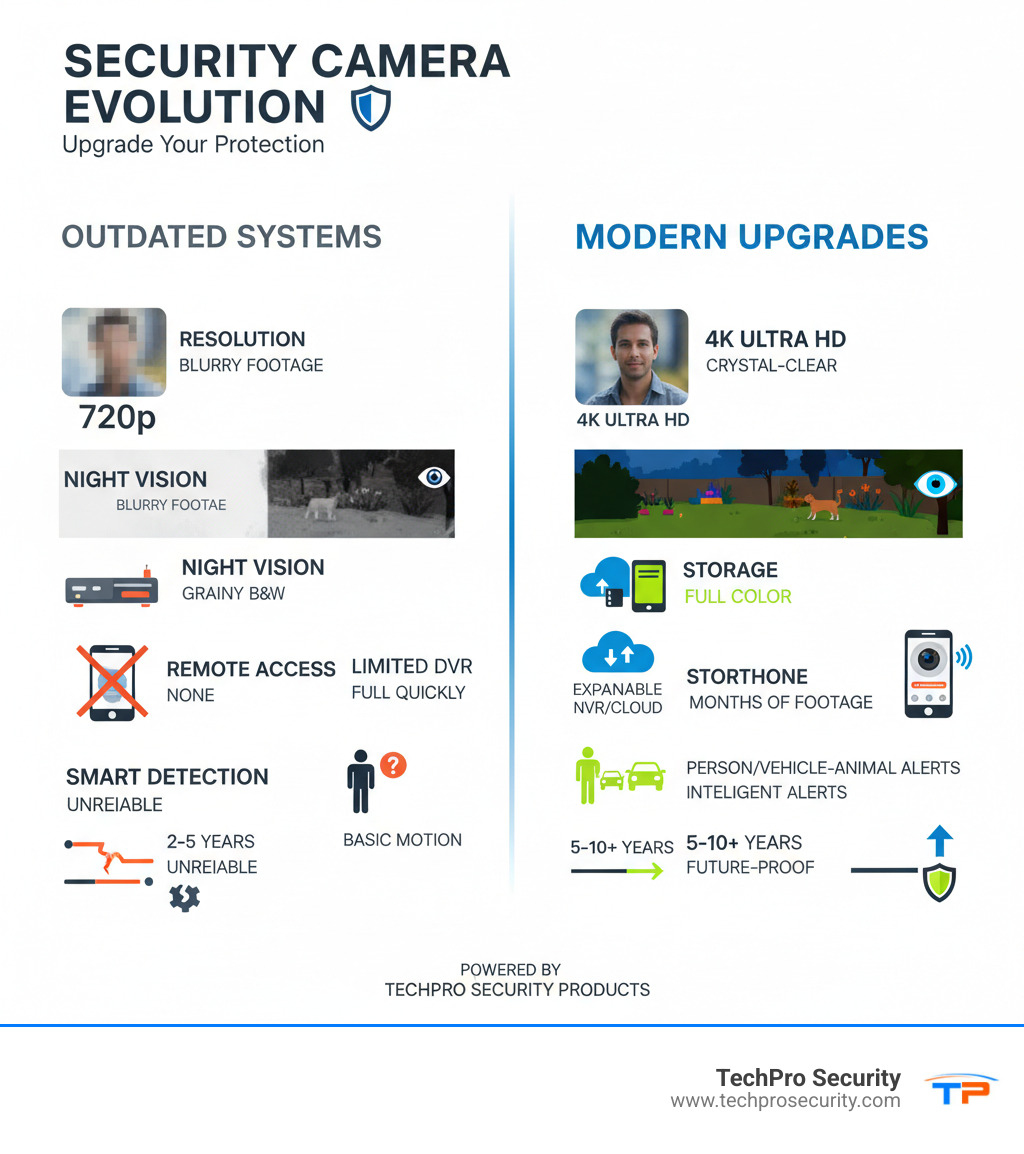
A security camera upgrade is essential if your current system has low resolution, outdated firmware, limited storage, poor night vision, or lacks remote access. Modern systems offer 4K clarity, smart detection, and mobile monitoring, changing your surveillance from a passive recorder into an active security tool.
Many systems installed just five to ten years ago are now liabilities. The blurry 720p footage that seemed adequate in 2015 won’t help police identify an intruder today. Outdated firmware leaves cameras vulnerable to hackers, while limited DVR storage means critical evidence can be overwritten before you even know an incident occurred.
Key reasons to upgrade your security cameras:
- Superior Image Quality: Move from blurry 720p to crystal-clear 4K for identifying faces and license plates.
- Smart Detection: Receive alerts for people, vehicles, or animals—not every moving leaf.
- Remote Access: Monitor your property in real-time from anywhere using your smartphone.
- Advanced Night Vision: See in full color in near-darkness, not just grainy black-and-white.
- Reliable Storage: Store weeks of footage on large hard drives or secure cloud platforms.
- Future-Proof Technology: Easily add cameras and integrate with smart home systems.
Old systems create a dangerous false sense of security. Their most common issues—low-resolution video, outdated firmware, and a lack of modern features—pose significant risks. Blurry footage results in unusable evidence for police or insurance claims. Unpatched firmware creates security breaches for hackers to exploit. Furthermore, older cameras often suffer from weather degradation and lack features like two-way audio or effective night vision, turning 24/7 surveillance into a daytime-only affair. The inability to monitor your property remotely means you can’t react to situations in real-time, a critical capability in today’s mobile world.
As Brad Besner, founder of TechPro Security Products, I’ve helped hundreds of South Florida homeowners and businesses transition from failing analog systems to modern security camera upgrades that prevent crime and provide usable evidence. My team has designed perimeter protection systems that have stopped hundreds of intrusions before they resulted in stolen property or worse.
Common Issues with Outdated Cameras
Many people hold onto old security cameras, but in security, “if it ain’t broke” often means “it’s not doing its job.” One of the biggest complaints is low-resolution video. Older 720p cameras produce blurry images, making it nearly impossible to identify faces or license plates. This renders your footage useless as evidence.
Outdated firmware is another critical vulnerability. Without regular updates, your cameras and DVRs are easy targets for hackers. Older systems also lack advanced features like smart motion detection, two-way audio, and effective night vision. Their limited storage means important recordings are often overwritten quickly. Finally, weather degradation takes a toll, causing malfunctions and reducing clarity, a particular problem in South Florida’s climate. For more on keeping your system in top shape, see our guide on security maintenance.
The Hidden Risks of Not Upgrading
Using an outdated system creates a false sense of security. The most significant risks include security breaches from unpatched firmware and collecting unusable evidence due to poor video quality. You also face higher maintenance costs from failing components and the inefficiency of manual monitoring.
Older systems typically lack smart home integration and, most importantly, the inability to monitor remotely. Checking on your property via a smartphone is a necessity, not a luxury. Without it, you lose the ability to receive real-time alerts and react promptly to developing situations.
The Tangible Benefits of a Modern Security Camera Upgrade
Upgrading your security system is like switching from a VHS tape to 4K streaming. A security camera upgrade isn’t just new hardware—it’s a complete change in how you protect what matters most.
Modern systems deliver better image quality to identify suspects, advanced features like smart alerts, and expanded coverage with fewer blind spots. You gain remote monitoring capabilities that put your property in the palm of your hand and scalability to grow your system over time.
The real payoff is genuine peace of mind. You’re not just recording events—you’re actively preventing problems with evidence that holds up when you need it. That’s the difference between an old system gathering dust and a modern one earning its keep.
From Blurry to 4K: The Clarity Revolution
Today’s cameras start at HD 1080p, but the real game-changer is 4K Ultra HD and even 12MP resolution. These aren’t just numbers; they deliver real-world results. While a 1080p camera might identify a face at 20 feet, a 4K camera can do so from 50 to 70 feet away. That’s the difference between catching a thief and having a useless, blurry image.
Modern digital zoom lets you inspect details without pixelation, so you can capture a license plate or a face from a distance. Cameras also feature wider viewing angles (130-145°), covering more ground with fewer devices and eliminating blind spots. This combination makes license plate recognition and facial identification remarkably accurate, providing law enforcement with evidence they can actually use.
Smart Features That Actively Protect You
Modern cameras don’t just record; they think. The biggest innovation is smart motion detection, which can differentiate between a person, vehicle, or animal. You get person/vehicle/animal alerts that matter, eliminating the constant false alarms from older systems.
Many cameras also include two-way talk, allowing you to speak directly to visitors, delivery drivers, or intruders through the camera. Tell a would-be thief they’re being recorded in 4K and that police are on the way.
Active deterrence takes protection a step further with motion-activated strobe lights and sirens. A bright 2600-lumen floodlight is enough to send any intruder running. These features integrate seamlessly with your smart home, allowing cameras to trigger lights, lock doors, or send alerts automatically. It’s like having a 24/7 security guard. For more on integration, check out our smart home installation services.
Key Features to Look for in Your Next Security System
When planning a security camera upgrade, knowing which features matter is crucial. The leap from analog to modern IP cameras is changeal.
| Feature | Old Analog Systems (Example) | Modern IP Systems (Example) |
|---|---|---|
| Resolution | 720p – 1080p (blurry) | 2K, 4K, 12MP, 16MP (crystal-clear) |
| Night Vision | Grainy B&W, limited range | Full Color, Starlight, IR (30-100ft+), Smart Hybrid Light |
| Storage | Limited DVR (days/weeks), overwritten | Large NVR (weeks/months), MicroSD, Cloud (secure, scalable) |
| Alerts | Basic motion detection (false alarms) | Person/Vehicle/Animal/Package Detection, Facial Recognition |
| Access | Local monitor, limited remote | Smartphone/Tablet App, Real-time Alerts, Two-Way Talk |
| Connectivity | Coaxial cable (analog signal) | Ethernet (PoE), Wi-Fi 6, 4G LTE (digital signal) |
Modern systems don’t just record what happens—they help you understand, respond to, and often prevent it.
Resolution and Field of View
For a proper security camera upgrade, we recommend starting with 4K Ultra HD (8MP) for outdoor cameras. For larger areas, 12MP or 16MP cameras provide even greater detail. This clarity is essential for identifying faces and license plates from a distance.
Resolution works with field of view. A wide-angle lens (110-180°) can reduce the number of cameras needed while eliminating blind spots. For large open spaces, Pan-Tilt-Zoom (PTZ) cameras allow you to remotely adjust your view, while dual-lens cameras offer both a panoramic view and a detailed zoom simultaneously. See why modern cameras are an excellent choice for a budget-friendly security upgrade.
Advanced Night Vision Technology
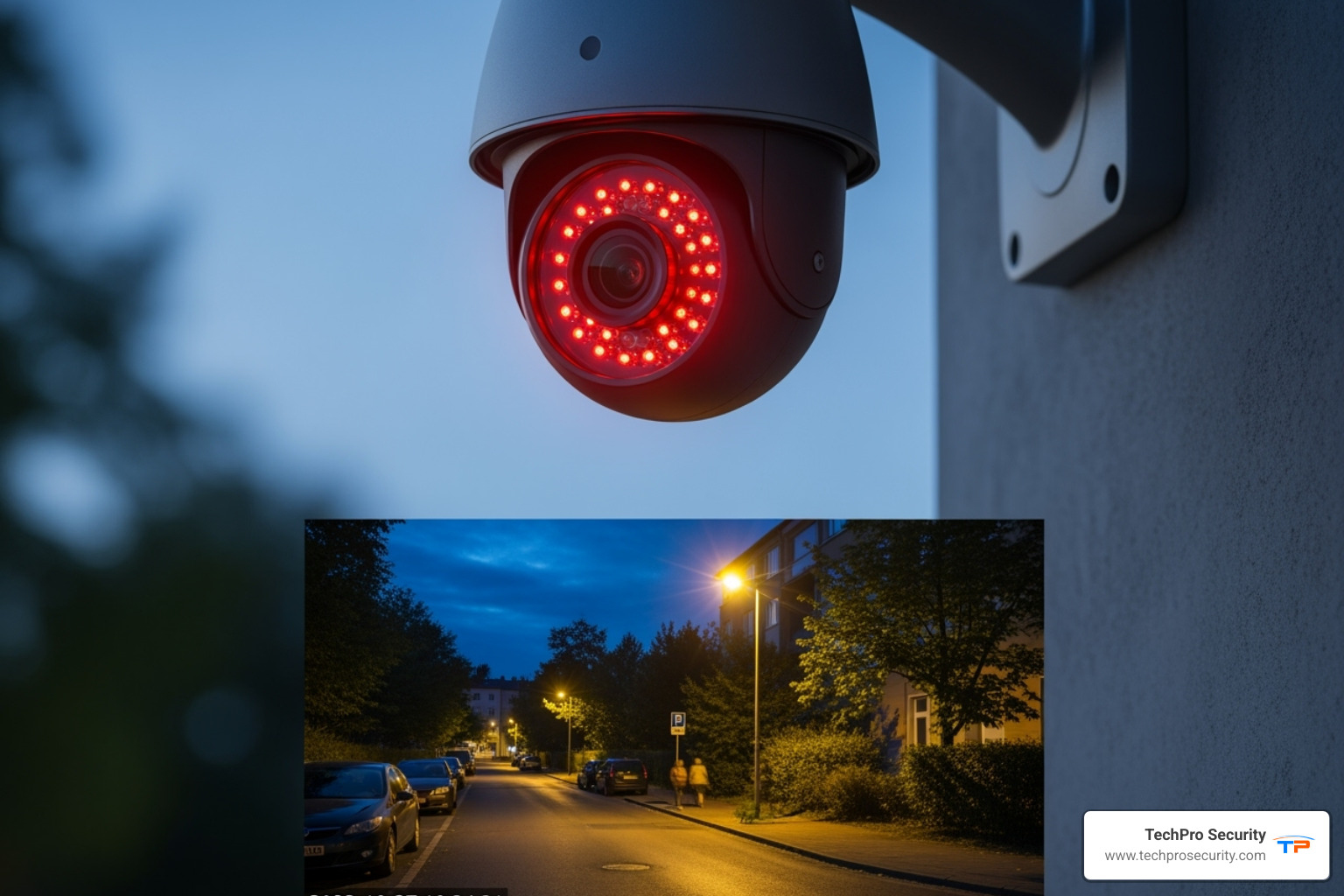
Most incidents happen after dark, which is why night vision is critical. Infrared (IR) night vision provides clear black-and-white footage in complete darkness, effective up to 100 feet or more.
Color night vision changes the game, using built-in spotlights or advanced sensors to capture full-color detail in low light. For the ultimate performance, Starlight sensors produce bright, detailed images using only ambient light like moonlight. A newer innovation is Smart Hybrid Light, which uses discreet IR until motion is detected, then switches to a white-light spotlight for full-color recording and active deterrence. Your security shouldn’t stop when the sun goes down. Learn more about starlight security cameras.
Storage and Connectivity Options
Modern systems solve the storage limitations of old DVRs. For wired systems, a NVR (Network Video Recorder) with large hard drives (up to 8TB or more) can store weeks or months of 4K footage. Many cameras also offer local storage via microSD cards as a backup.
For ultimate security, cloud storage keeps your footage safe off-site, accessible from anywhere. This protects your evidence from theft or damage to the NVR. We offer cloud backup and file storage solutions, though many systems provide robust local storage without mandatory monthly fees.
For connectivity, PoE (Power over Ethernet) is the gold standard. A single Ethernet cable provides both power and data, simplifying installation and ensuring a reliable connection up to 328 feet. For locations where cables are impractical, Wi-Fi 6 cameras offer robust wireless performance. A well-designed system gives you the flexibility to mix technologies for complete and reliable coverage. Learn more about our process in our guide to security camera installation.
Planning and Executing Your Upgrade
Starting on a security camera upgrade is a manageable process that moves your property from reactive surveillance to proactive protection.
Assessing Your Current System: When to Upgrade
Before buying new gear, assess your current setup. Analog cameras typically last 5-10 years, while their DVRs last 5-7 years. Modern IP cameras last 6-10 years, with NVRs lasting about 5 years. Beyond age, signs you need an upgrade include low image quality, a lack of modern features (like smart detection or two-way audio), limited storage, or frequent glitches. Sometimes, a phased upgrade is possible, but often a full replacement is the most effective path forward.
Individual Cameras vs. a Full System Security Camera Upgrade
Should you replace a few cameras or the whole system? Replacing individual cameras can be cost-effective if your NVR and cabling are compatible. Hybrid DVRs, for example, can accept a mix of camera types, allowing for a gradual transition.
However, a full system security camera upgrade delivers the best long-term value. It ensures consistent performance, seamless integration, and access to the latest AI features. This approach future-proofs your investment and, for businesses, allows for integration with other security layers like access control systems.
Cabling and Power: The PoE Advantage
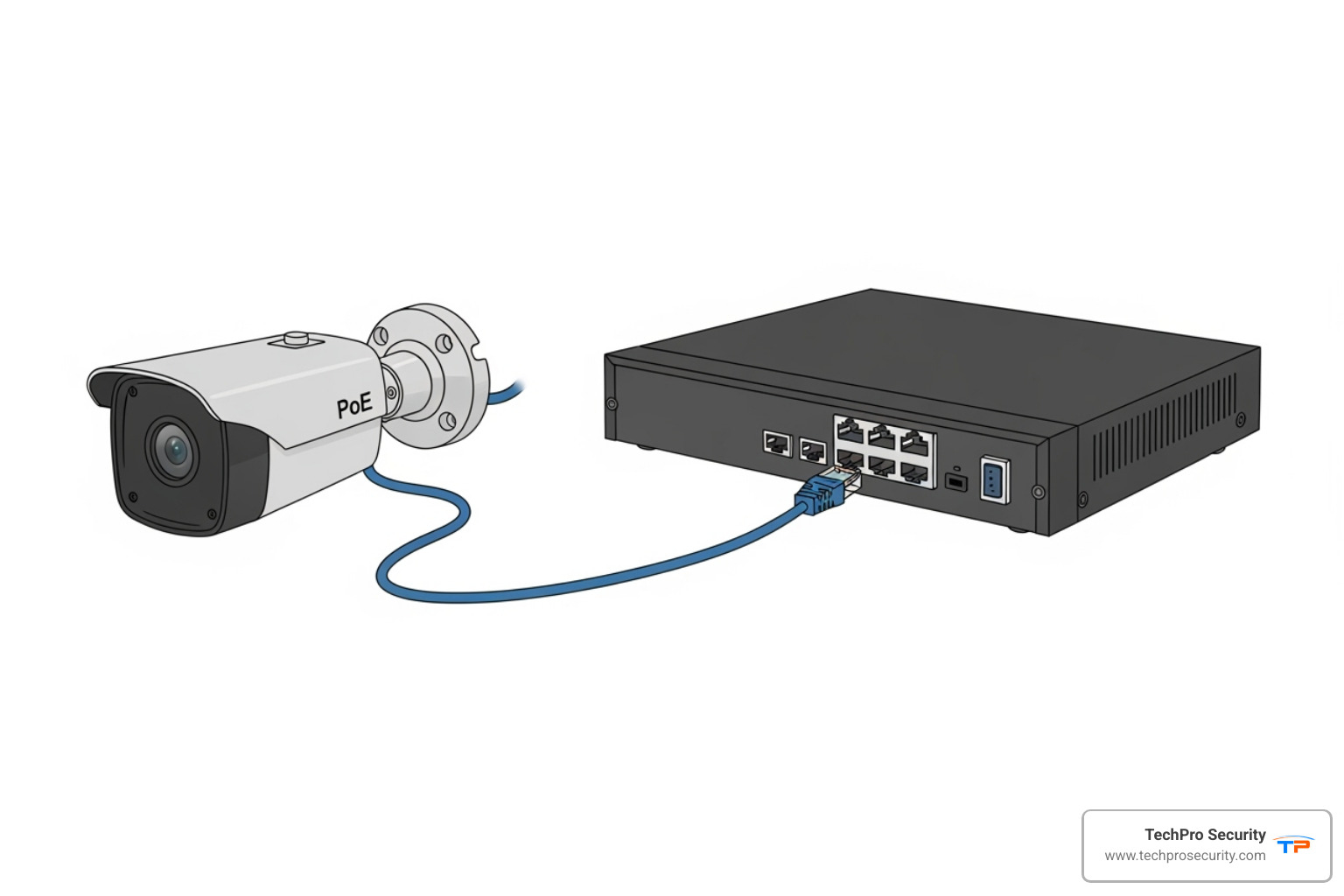
Your cabling infrastructure is critical. While older systems used coaxial cables, modern IP cameras require Ethernet cables (Cat5e or Cat6) for optimal performance. This is where PoE (Power over Ethernet) is a game-changer. PoE delivers both power and data through a single Ethernet cable, dramatically simplifying installation. You just run one cable from your camera to the NVR—no separate power adapters needed.
PoE works reliably up to 328 feet (100 meters). Beyond that, you’ll need extenders. While running new cables can be the most challenging part of a DIY installation, the reliability is worth it. If you’d rather not deal with fishing wires through walls, our team at TechPro Security provides professional security camera installation services throughout South Florida.
Step-by-Step Guide to Your Security Camera Upgrade
Whether DIY or professional, the process is straightforward:
- Plan Camera Locations: Identify key entry points, high-traffic areas, and blind spots. Mount cameras about 9 feet high, avoiding direct light sources and respecting your neighbors’ privacy.
- Run Cables: If upgrading to IP cameras, run Ethernet cables from each camera location back to your NVR.
- Install the NVR: Place the NVR in a secure, cool location near your internet router. Connect it to power and your network.
- Mount New Cameras: Install your cameras using the provided hardware, positioning them under eaves for protection where possible.
- Connect Everything: For PoE systems, simply plug the Ethernet cable from each camera into the NVR.
- Configure Your System: Use the manufacturer’s app to add your cameras, set up motion detection zones, and enable remote access for monitoring from your smartphone.
Frequently Asked Questions about Security Camera Upgrades
What is the typical lifespan of security cameras and recorders?
The lifespan varies by type. Analog cameras typically last 5-10 years, and their DVRs last 5-7 years. Modern IP cameras have a lifespan of 6-10 years, while NVRs last around 5 years. You should consider an upgrade when performance degrades or when new technology offers significantly better protection than your current system.
Can I use my old coaxial cables for new IP cameras?
No, standard IP cameras require Ethernet cables (like Cat5e or Cat6) to transmit digital data and receive power via PoE. Coaxial cables were designed for analog signals. While converters exist, they are a compromise. For a full 4K camera setup and optimal performance, replacing your coaxial cables with new Ethernet runs is highly recommended to ensure reliability and future-proof your system.
Should I perform the upgrade myself or hire a professional?
This depends on your comfort level with technology and the project’s complexity. A DIY upgrade is feasible for simple systems if you’re comfortable running cables and configuring network settings. However, for larger properties or to ensure optimal camera placement and secure integration, hiring a professional is the smarter choice.
Professional installation ensures the job is done correctly the first time, saving you from troubleshooting headaches. While professional installation can cost up to $3,500 depending on the scope, the peace of mind and expert setup are invaluable. A poorly installed DIY system can create security gaps and end up costing more in the long run. At TechPro Security, we provide expert installation with free US-based support and extensive warranties.
Conclusion
Your home or business deserves better than grainy footage and outdated technology. A security camera upgrade is an investment in taking control of your property’s safety with tools that work when you need them most.
You gain crystal-clear 4K video, intelligent alerts that reduce false alarms, and the freedom to monitor what matters from anywhere in the world. The difference modern surveillance makes is night and day—literally, thanks to advanced color night vision.
We’ve walked hundreds of South Florida property owners through this journey. The relief they feel with a clear, reliable, and accessible system is why we do what we do. Your security shouldn’t be a source of uncertainty.
At TechPro Security, we specialize in making this transition seamless. Our experienced team designs custom solutions to fit your needs and budget, backed by extensive warranties and free US-based support. From assessment to configuration, we’re with you every step of the way.
Ready to see what modern surveillance can do for you? Let’s create a security system that gives you real peace of mind. Contact us today for a comprehensive consultation on our CCTV services.